Quick AVI MPEG Joiner 2.1
Updated on 21 Feb 2012
By Anthony Buckner
By Anthony Buckner
Specifications
License:
Shareware
Updated:
Downloads:
1491
Platform:
Windows All
Publisher:
GoldzSoft(more)
Website:
User Reviews:
Other versions:
2.1, 2.0.1.23, 2.0
Do you like
Quick AVI MPEG Joiner?
FindMySoft Editor's Review
Quick AVI MPEG Joiner – Join AVI and MPEG Video Files
The GoldzSoft-developed application Quick AVI MPEG Joiner performs a specialized task and it performs it quickly. As its name points out, it joins together AVI and MPEG video files. If you have a few short AVI files and you want to join them together to come up with a longer video, you can easily do that with the Quick AVI MPEG Joiner.
To start using Quick AVI MPEG Joiner you must first get a 3.7MB executable onto your computer, then install the application. It is a simple process through which you are guided by a setup wizard. You will be done with the download and installation processes in very little time.
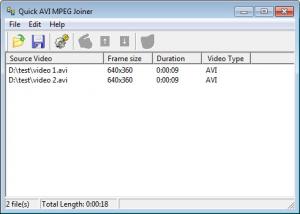
The Quick AVI MPEG Joiner interface is incredibly easy to use. At the top there are the buttons for the application’s main functions; below it, there’s a window that displays all the videos you’ve selected to be joined together.
To join videos together you need only add them to the abovementioned list by clicking the “Add Video File” button or by using the handy shortcut Ctrl + O. To help you make sure you selected the right video, Quick AVI MPEG Joiner comes with a preview feature; select “Play Selected Video” and your media player will launch and play the selected video. After you added all the videos you want to join, you can set the output video frame size, video format (AVI or MPEG) and audio format from the Options menu. If you don’t want to play with the options, just hit the “Join Video Files” button or Ctrl + S keyboard shortcut and Quick AVI MPEG Joiner will go to work. After you choose a name for the new video and the location where it will be saved, Quick AVI MPEG Joiner will join all the small video files into one large file.
Please note that the trial version of Quick AVI MPEG Joiner will only join the first 10 seconds of each video file. You have to get a license to remove this limitation.
Quick AVI MPEG Joiner does just what it says it can do: it quickly joins AVI and MPEG files together.
Pros
Simple download and installation processes that take little time to complete. Very easy to use interface. Select multiple AVI and MPEG files and join them together. Play a video from the list of videos to be joined. Quick AVI MPEG Joiner does its job rapidly.
Cons
The trial version joins the first 10 seconds of each video file.
To start using Quick AVI MPEG Joiner you must first get a 3.7MB executable onto your computer, then install the application. It is a simple process through which you are guided by a setup wizard. You will be done with the download and installation processes in very little time.
The Quick AVI MPEG Joiner interface is incredibly easy to use. At the top there are the buttons for the application’s main functions; below it, there’s a window that displays all the videos you’ve selected to be joined together.
To join videos together you need only add them to the abovementioned list by clicking the “Add Video File” button or by using the handy shortcut Ctrl + O. To help you make sure you selected the right video, Quick AVI MPEG Joiner comes with a preview feature; select “Play Selected Video” and your media player will launch and play the selected video. After you added all the videos you want to join, you can set the output video frame size, video format (AVI or MPEG) and audio format from the Options menu. If you don’t want to play with the options, just hit the “Join Video Files” button or Ctrl + S keyboard shortcut and Quick AVI MPEG Joiner will go to work. After you choose a name for the new video and the location where it will be saved, Quick AVI MPEG Joiner will join all the small video files into one large file.
Please note that the trial version of Quick AVI MPEG Joiner will only join the first 10 seconds of each video file. You have to get a license to remove this limitation.
Quick AVI MPEG Joiner does just what it says it can do: it quickly joins AVI and MPEG files together.
Pros
Simple download and installation processes that take little time to complete. Very easy to use interface. Select multiple AVI and MPEG files and join them together. Play a video from the list of videos to be joined. Quick AVI MPEG Joiner does its job rapidly.
Cons
The trial version joins the first 10 seconds of each video file.
System Requirements
32M RAM
Do you like Quick AVI MPEG Joiner
Quick Look VideoNew
Popular News
The soon to be released Samsung Galaxy S3 is shaping up to be an event bigger commercial success than its predecessor, the Samsung Galaxy S2
Linux fans once again have the chance to take part in the annual Linux Foundation T-Shirt Design Contest, now in its 3rd edition
Quick AVI MPEG Joiner Awards
Quick AVI MPEG Joiner Editor's Review Rating
Quick AVI MPEG Joiner has been reviewed by George Norman on
21 Feb 2012. Based on the user interface, features and complexity, Findmysoft has rated
Quick AVI MPEG Joiner
3
out of 5 stars, naming it Very GoodYour Rating
Top Downloads
2.
Opera5.
Trillian8.
AIM9.
Skype10.
Ad-Aware12.
Nero13.
Google Earth14.
Picasa15.
Winamp16.
iTunes17.
RealPlayer18.
uTorrent19.
eMule20.
WinRAR21.
BitComet22.
WinZip23.
Shareaza24.
CCleaner25.
Recuva26.
Tweak UI27.
CuteFTP Home29.
Adobe Reader30.
NewsPiperBecome A Fan!
Link To Us!
Quick AVI MPEG Joiner
HTML Linking Code
HTML Linking Code
Latest Reviews